
Invoice Generator for Small Businesses – Create Professional Invoices the Right Way

What Is an Invoice and Why It Matters for Your Business

An invoice is a formal document issued by a seller to a customer that clearly outlines the products or services provided, their costs, and the total amount due. For small businesses, freelancers, consultants, and service providers, invoices are not optional paperwork — they are the backbone of professional financial management.

Invoices help businesses track income, monitor outstanding payments, and maintain accurate records. Without proper invoices, it becomes difficult to know who owes you money, when payments are due, or how much revenue your business is actually generating. Informal billing methods often lead to confusion, delayed payments, and disputes that can damage customer relationships.

Beyond payment collection, invoices also serve as proof of transactions. They help resolve disagreements, support bookkeeping, and simplify accounting tasks. When businesses grow, having organized invoices becomes essential for financial reviews, audits, and long-term planning.

A well-structured invoice also reflects professionalism. Clear descriptions, accurate totals, and proper formatting show clients that you take your work seriously. Customers are more likely to pay on time when the invoice is easy to understand and looks legitimate.

This page explains how invoices work, how to calculate invoice amounts correctly, common mistakes to avoid, and best practices for professional invoicing. You can also use our free invoice generator to create clean, professional invoices quickly — without registration or complex software.

Create Your Invoice Using Our Free Invoice Generator

Preparing invoice…

INVOICE

+ Add Logo Business Logo
Invoice By
Invoice To
Item / Description Qty Rate Amount
Terms & Conditions
Additional Notes
Sub Total0.00
Discount
$
Tax (%)
Shipping
$
Total0.00
Invoice Total (in words)
Amount Paid
$
Balance Due0.00
Tip: Press Enter in the Rate field to add a new line automatically.
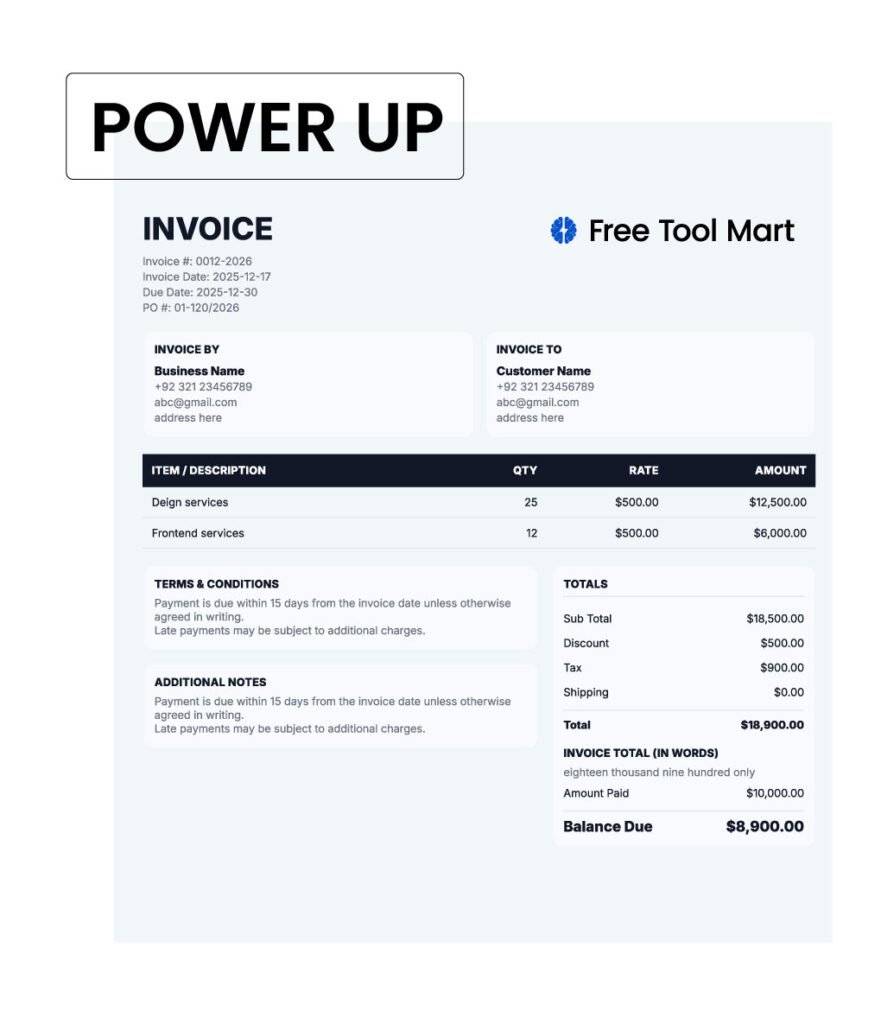
INVOICE
Invoice #:
Invoice Date:
Due Date:
PO #:
Invoice By
Invoice To
Item / Description Qty Rate Amount
Terms & Conditions
Additional Notes
Totals
Sub Total
Discount
Tax
Shipping
Total
Invoice Total (in words)
Amount Paid
Balance Due

Our invoice generator helps you create professional invoices in minutes. You can add your business details, customer information, line items, taxes, and totals, then download or print the invoice instantly. No mandatory sign-up is required, making it ideal for freelancers and small businesses who need fast, reliable invoicing.

Benefits of using an online invoice generator for fast and professional billing

How an Invoice Works (With a Simple Example)

A standard invoice follows a structured format so both the seller and the customer clearly understand the transaction. While invoice designs may vary, the core components remain the same.

A professional invoice typically includes:

  • Seller details – Business name, address, and contact information
  • Customer details – Client name and address
  • Invoice number – A unique reference number
  • Invoice date – When the invoice is issued
  • Payment due date – Deadline for payment
  • Itemized list – Products or services provided
  • Subtotal – Total before tax or discounts
  • Tax – Applicable tax amount, if any
  • Final total – Total amount payable
  • Payment terms – Accepted payment methods and conditions

Example:
If you provided graphic design services worth $600 and applied a 10% tax, the invoice would list the service, calculate the tax separately, and clearly show the final amount of $660. This transparency reduces misunderstandings and improves payment reliability.

How to Calculate an Invoice Amount Manually

Understanding how invoice totals are calculated helps prevent billing errors and builds confidence in your financial records. Even when using an invoice generator, knowing the manual calculation process is valuable.

Step-by-step calculation:

  1. Calculate each line item
    Quantity × Rate
    Example: 8 hours × $50 = $400
  2. Calculate the subtotal
    Add all line item totals
  3. Apply taxes (if applicable)
    Subtotal × Tax rate
    Example: $400 × 10% = $40
  4. Apply discounts (if any)
    Subtotal − Discount
  5. Calculate the final total
    Subtotal + Tax − Discounts

Manual calculation knowledge allows you to verify invoice accuracy and handle special pricing situations confidently.

How Professional Invoices Improve Cash Flow

Invoices are directly connected to cash flow. Clear, professional invoices help businesses get paid faster by reducing confusion and eliminating back-and-forth communication. When customers know exactly what they owe and when payment is due, delays become less common.

Well-structured invoices include clear due dates, itemized charges, and payment instructions. This clarity minimizes disputes and encourages timely payments. In contrast, vague or incomplete invoices often lead to delayed responses or payment questions.

Professional invoices also improve trust. Clients are more likely to prioritize payments when they receive organized and properly formatted documents. Over time, consistent invoicing helps businesses maintain predictable income and plan expenses more effectively.

Free online invoice generator to create professional invoices

Common Types of Invoices Businesses Use

Different business scenarios require different invoice formats. Understanding invoice types helps you bill correctly.

  • Standard Invoice – Used for most sales and services
  • Proforma Invoice – Issued before delivering goods or services
  • Commercial Invoice – Required for international trade
  • Recurring Invoice – Used for subscription or monthly services
  • Credit Invoice – Issued when a refund or adjustment is needed

Using the correct invoice type ensures clarity and compliance in business transactions.

Who Should Use an Invoice Generator

An invoice generator is useful for a wide range of professionals and businesses. Freelancers benefit from fast invoice creation without needing complex accounting software. Small business owners can generate consistent invoices while focusing on daily operations.

Consultants and service providers use invoice generators to bill clients accurately based on time or services delivered. Online sellers and contractors also benefit from quick invoicing tools that simplify record-keeping.

For businesses that issue invoices occasionally or operate on a smaller scale, an invoice generator provides efficiency without unnecessary overhead.

When an Invoice Generator May Not Be Enough

While invoice generators are suitable for most small businesses, they may not be ideal for every situation. Large enterprises with complex tax requirements, multi-currency transactions, or advanced reporting needs may require full accounting or ERP systems.

Businesses operating under strict regulatory frameworks should consult financial professionals to ensure compliance. Invoice generators work best for straightforward invoicing needs and day-to-day billing.

Common Invoice Mistakes That Delay Payments

Many late payments are caused by preventable invoicing errors.

Avoid these mistakes:

  • Missing invoice numbers
  • Incorrect totals or tax calculations
  • No clear payment deadline
  • Vague service descriptions
  • Unprofessional formatting

A clear and accurate invoice reduces friction and improves payment reliability.

Important Invoice Best Practices for Small Businesses

  • Always use unique invoice numbers
  • Keep digital copies of all invoices
  • Clearly define payment terms
  • Review invoices before sending
  • Use consistent formatting

Professional invoicing protects your business and simplifies financial tracking.

Frequently Asked Questions About Invoice Generators

Yes, invoices are essential for small businesses because they create a clear and documented record of every transaction. They help track income, manage outstanding payments, and reduce misunderstandings with customers. Invoices also support financial planning and make it easier to organize records for accounting or audits when required.

Using an online invoice generator is generally safe when the tool does not store or share sensitive data without permission. Reliable invoice generators process information locally or only for document creation, ensuring user privacy. It’s always recommended to avoid entering unnecessary personal or financial information into any online tool.

Yes, many small businesses prefer invoice generators that do not require registration. Creating invoices without mandatory login saves time and allows users to generate documents instantly. This is especially useful for freelancers and occasional sellers who need quick invoicing without managing additional accounts.

Invoice requirements vary depending on business type, location, and transaction nature. While not all regions legally mandate invoices for every sale, invoices are widely accepted as proof of transactions. They help resolve disputes, support accounting accuracy, and demonstrate professionalism in business operations.

Once an invoice is sent, it’s best practice not to modify the original document. Instead, businesses should issue a revised or corrected invoice that clearly references the original. This maintains transparency, avoids confusion, and keeps financial records accurate and consistent.

Absolutely. Invoices are one of the most important documents in accounting. They provide clear income records, support expense matching, and simplify financial reporting. Well-organized invoices make bookkeeping more efficient and reduce errors during tax preparation or financial reviews.

Related Calculators

Explore more tools on Free Tool Mart:

Mortgage Calculator

Check monthly installments, long-term affordability, and total loan cost using clear and precise metrics.

Tax Calculator

Get immediate tax estimates based on updated rules and dependable formulas designed for quick financial planning.

Retirement Savings Calculator

Plan your retirement confidently by projecting savings goals, growth over time, and the impact of contributions, inflation, and expected returns.

Scroll to Top